NETWORK TOPOLOGIES
Topology is the design for the physical layout of a network. A Technology Coordinator needs to understand topology in order to create the school (and district’s) network components based on budget. They also need to be versed in network topology for imaging and placement implications, network permissions, and troubleshooting.
There is some basic terminology that is associated with any network:
- node: any device (computer, printer) that is connected to the network.
- backbone: the main cabling of a network to which all of the segments connect. Usually, the backbone is capable of carrying more information than any individual segments.
- segment: any cabling portion of a network.
- LAN Local Area Network: A LAN is a network of computers that are in the same general physical location-- building or a campus.
- WAN Wide Area Network is used if the computers are far apart (such as across town or in different cities)
There are four basic types of network topologies: star, bus, ring and mesh
Bus
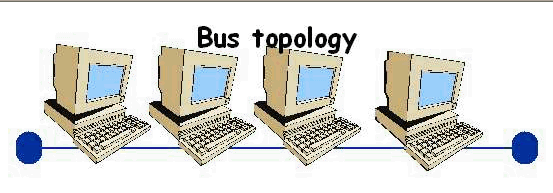 In a bus topology each node is connected to a central line or backbone. The cabling is connected to repeaters on one end and terminated at the other end. There are some major problems with this topology. If any part of the cable is broken or removed from the terminator, every computer will loose connection with the network. Thus f any one of the nodes on the network goes down the rest can also lose connectivity. If there are performance or data integrity issues they can be difficult and frustrating to find as well.
Star
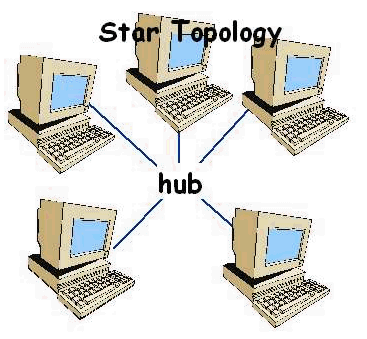 In a Star topology, all devices are connected to a central hub. The hub moves signals from any node and passes it along to all the other nodes in the network. Hubs do not filter or route data. They simply join nodes together. Star is the most common today since enables the network to remain stable, even when one cabling connection fails. If the hub fails however, the network will lose connection.
Ring
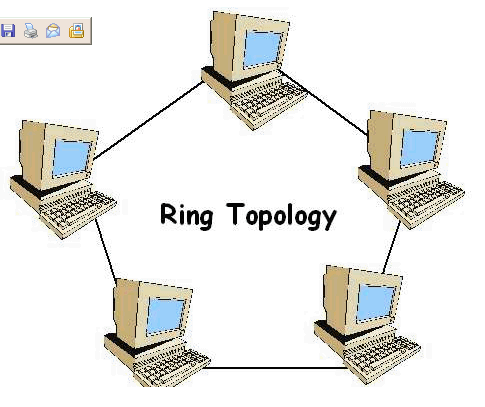
This topology is very similar to bus except the end of the network returns to the first node which means it is in a loop. In a ring network, each node takes a turn sending and receiving information through the use of a token. Only the node with the token is allowed to send data. All other nodes must wait until the token is not accompanyed by a message before they may use it to transmit. Ring topology has many of the same limitation of the bus topology.
Mesh
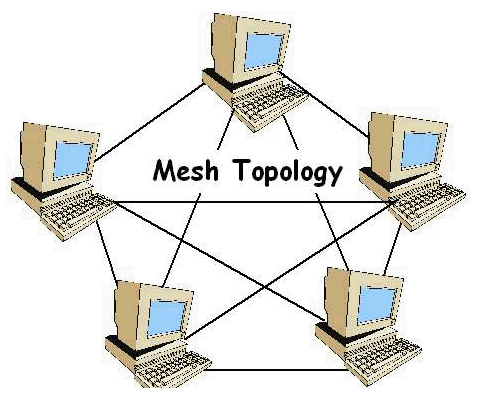
In a mesh topology, every device is connected to every device. While t his topology is the most
challenging to establish, it has many advantages. Since it is a redundant network, if any part of the network is down, alternate routes are available.This topology is very expensive to implement and is only really used in large WANs where the network has to be up all the time.
graphics created with Tool Factory Workshop software
DATA PACKAGING
The OSI reference model divides network communication into 7 layers. Each one covers different protocols. It defines how each layer communicates and works with the layer above and below it.
| Application: The Application layer provides services to the software through which the user requests network services. Your computer application software is not on the Application layer. This layer isn't about applications and doesn't contain any applications. In other words, programs such as Microsoft Word or Corel are not at this layer, but browsers, FTP clients, and mail clients are. |
| Presentation: This layer is concerned with data representation and code formatting. |
| Session: The Session layer establishes, maintains, and manages the communication session between computers |
| Transport: This is the layer where the messages are broken up into pieces called Segments. |
| Network: The network layer is where the messages are addressed with an IP address, and broken into pieces called Packets. |
| Data-Link: The data link layer is where all of the eror checking and flow control occurs. This is where messages are carved up into tinier pieces called Frames. |
| Physical: In the physical layer, frames are broken up into binary DIGITS (bits) and put onto the network. |
PROTOCOLS
Put simply, protocols are rules. They define how devices communicate with one another across a network. Since the entire operation by which data is transmitted needs to be broken down into steps, each step includes its own rules or protocols. They must be carried out in order from the bottom up. As long as nodes are using the same protocol, they can exchange data. Protocols at the sending computer include: Breaking data into packets, adding addressing information, and preparing data for transmission. At the receiving computer the steps are followed in the reverse order: take packets off the cable, bring packets into the computer through NIC, strip packets of all transmitting information, copy the data to a buffer for reassembly, and pass the data on in a useable form.
The most used protocol on modern networks is the Internet Protocol (IP). IP is a set of rules agreed upon by all computers connected to the Internet and most LANs and WANs. Internet Protocol is most well known for its addressing, where each computer is given four numbers separated by dots, called "octets". Every node connected to a network has a unique IP address, and each network is connected together with its each unique address, making every computer connected to an Internet-connected network accessible to every other computer.
BANDWIDTH
Bandwidth includes the range within a band of frequencies or wavelengths as well as the amount of data that can be transmitted in a fixed amount of time. Like the highway system, bandwidth is designed to carry network traffic. The wider the highway, the more traffic that can be carried. Just like the highway system, however, bandwidth is only a potential. Since bandwidth is a measure of potential speed as well as potential data that can be carried, there can be bottlenecks in networks that increase the overall time traffic takes to get from one place to another
WIRING
Each type of wiring has a different bandwidth, cost, and interference limitations. the cable selected will connect to a NIC (Network Interface Card) in a computer or device that will allow it to access the network. The cables used to create a network varies, and it is important to consider all opitons in determining which type of cabing is best for any networking situation.
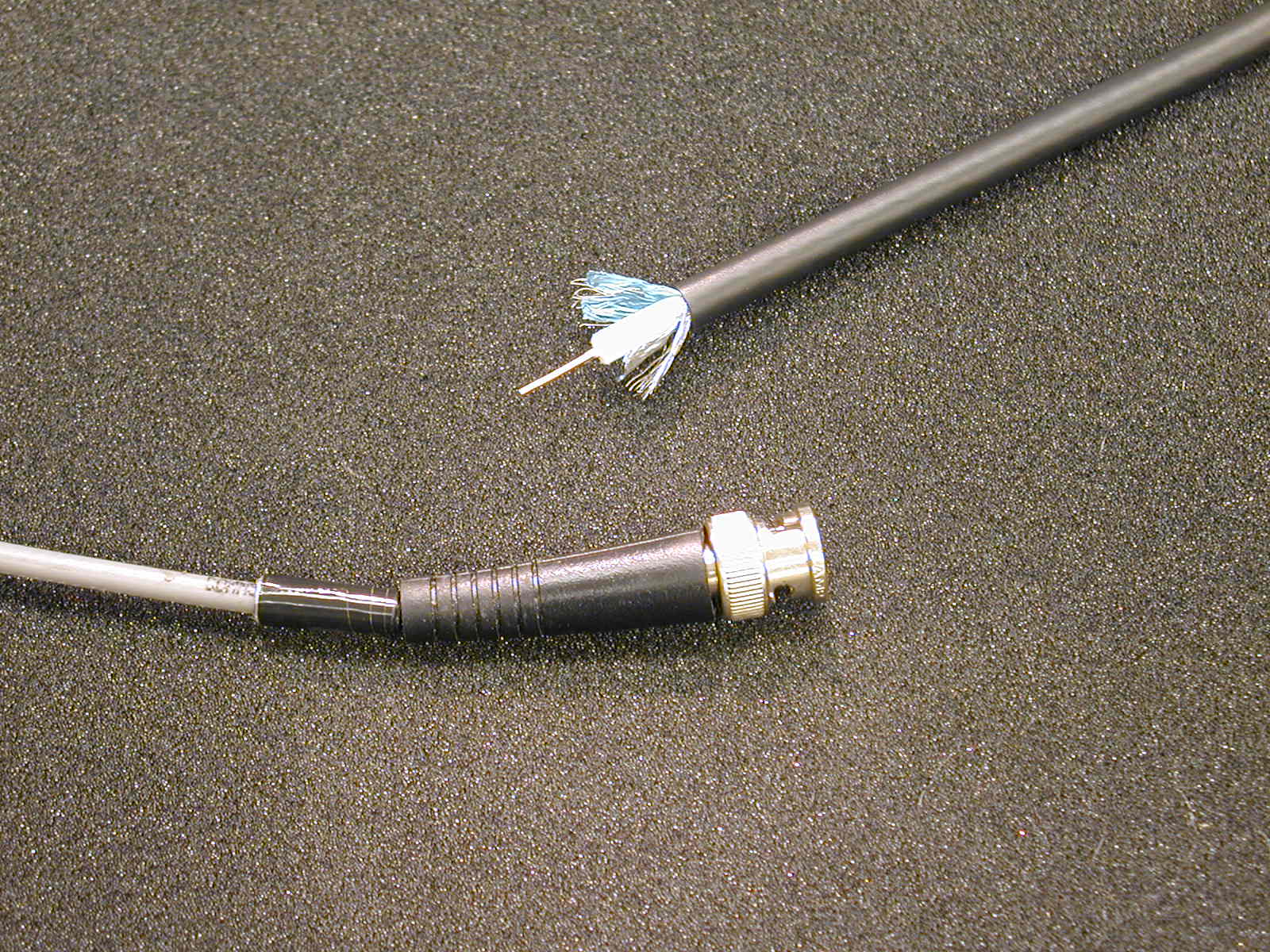 Coaxial Cable
Coaxial Cable was at one time the most widely used network cabling. It is light, easy to work with, flexible, and relatively inexpensive. It consists of copper wiring surrounded by insulation, braided metal shielding and an outer cover. It is the copper core that carries the electronic signals.
Thinnet coax (10Base2) is referred for medium to large networks with high security needs. Easy installation resists interference well.
Thicknet coax (10Base5)are used to provide a link between Thinnet networks. This cable system also resists interference well, but is a bit more challenging to install.
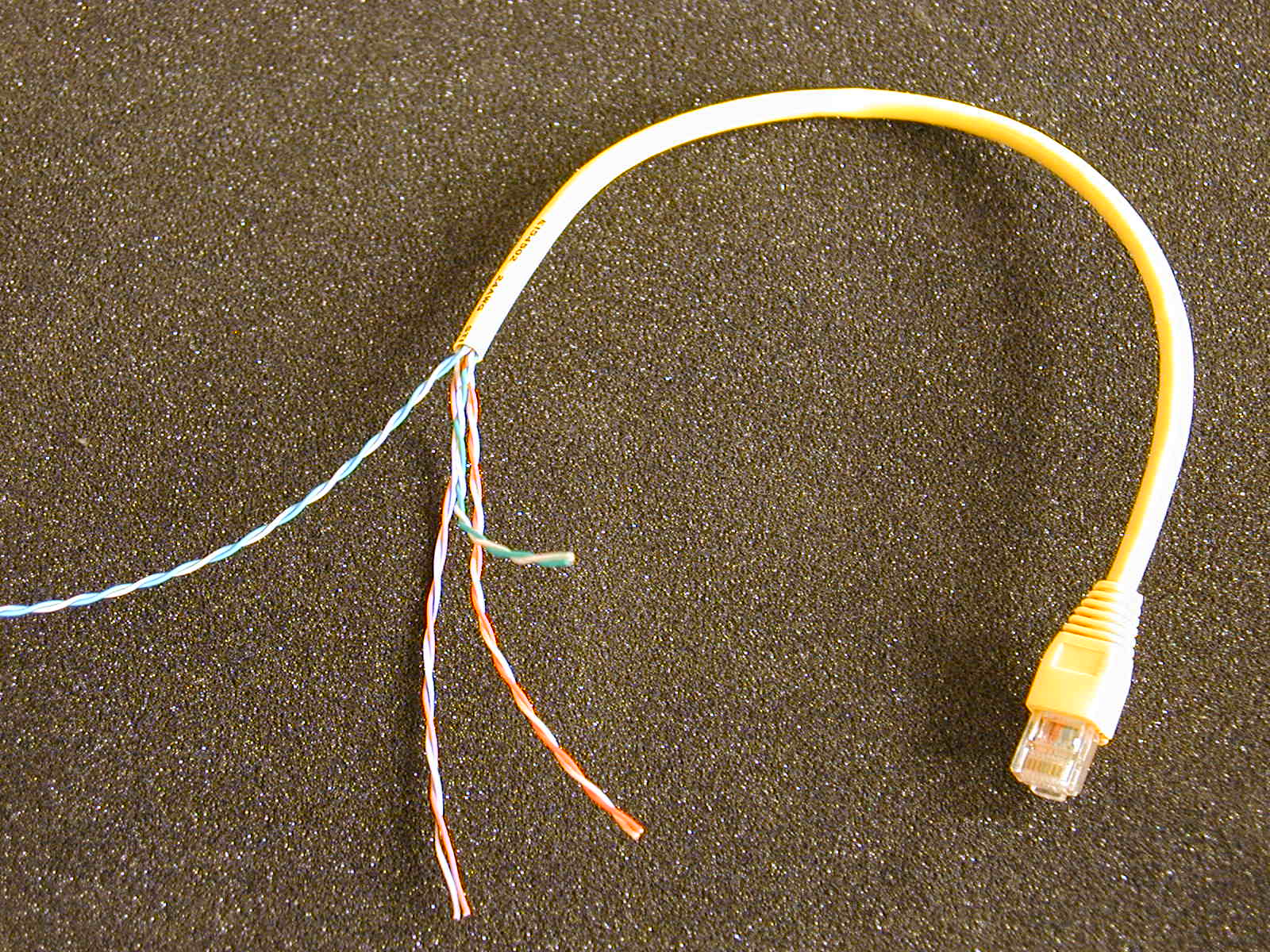
Twisted Pair
By far the most popular LAN cabling is Twisted Pair. In simplest form it consists of insulated strands of copper wire twisted around one another. Twisted pair is either unshielded (UTP) or shielded (STP). Most phone systems use a type of UTP which is one reason why it is so popular. One should consider twisted-pair cable if you are under budget constraints and you want a simple installation. If the LAN requires a high level of security or data integrity or you need to transmit data over long distances at high speeds, twisted pair should not be used.
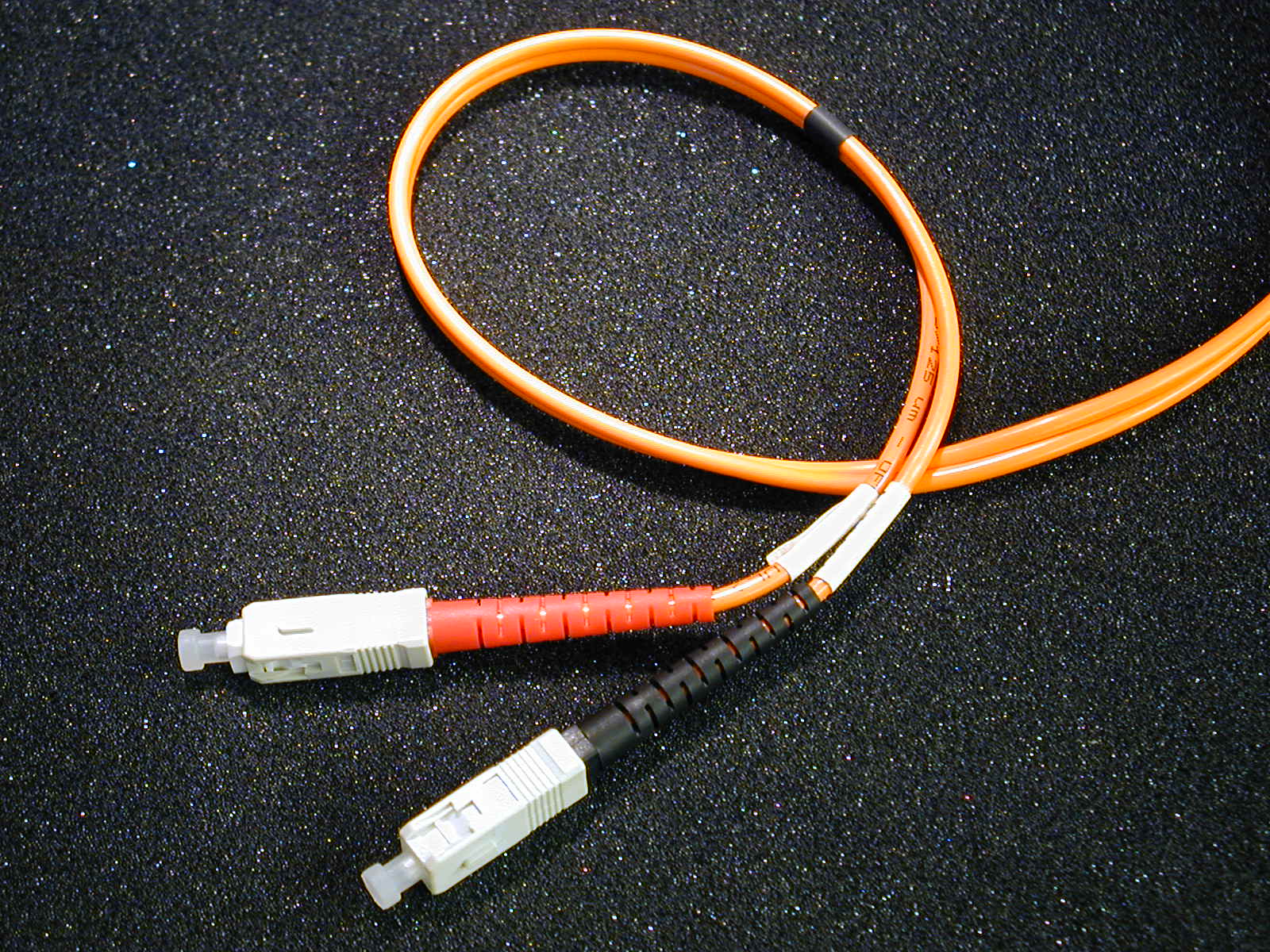 Fiber-Optic Cable
Alhough expensive, fiber optic cabling is the choice for very high speed, high-capacity data transmission. In this type of cabling, optical fibers are used to carry digital data signals in the form of modulated light pulses. Since no electrical signals are being transmitted, a fiber-optic network is very secure.
WIRELESS
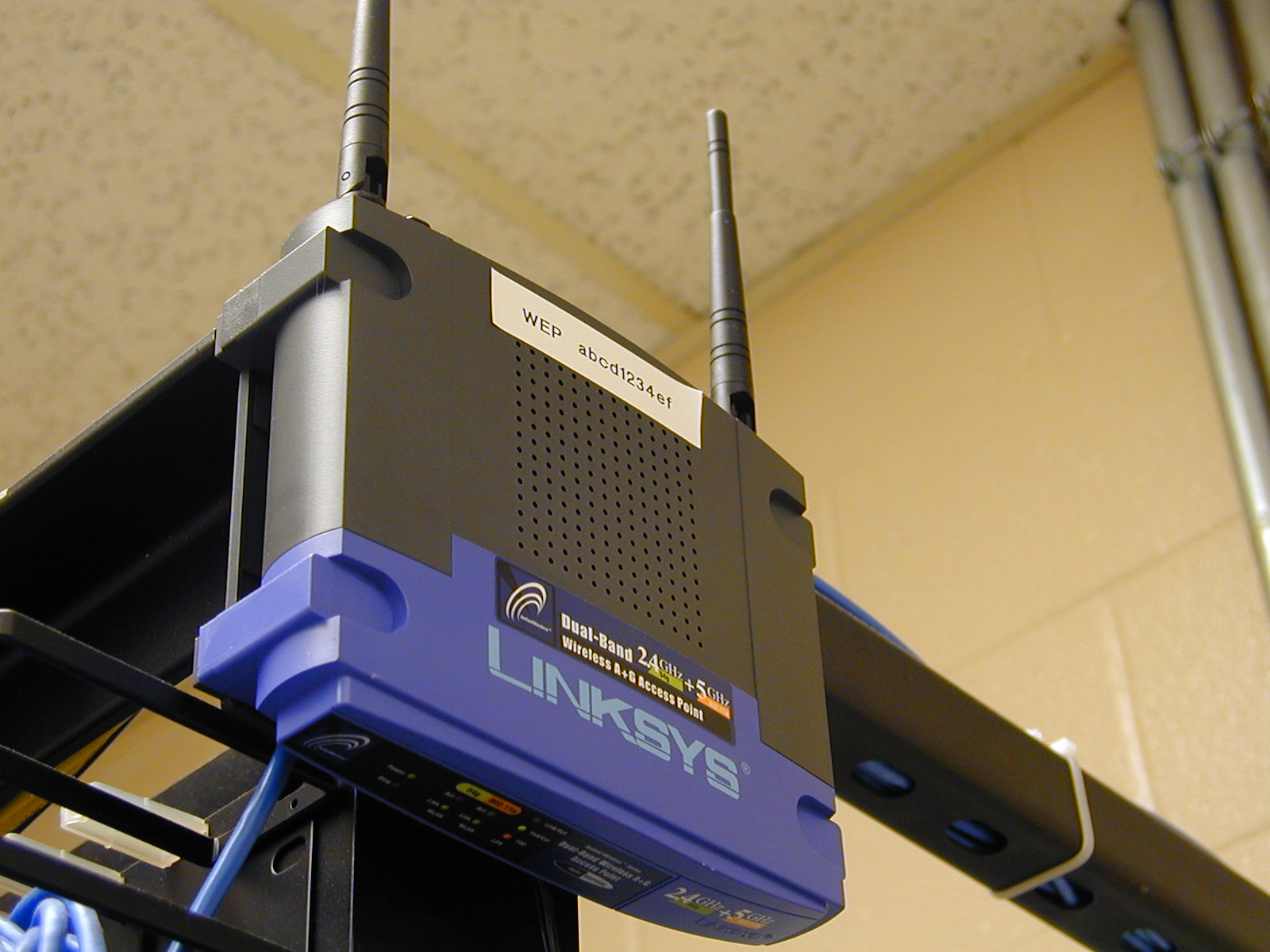 Wireless networking is fast becoming a very popular media type. With low infractructure costs, ease of setup and the fact that nearly all laptop computers sold today ship with built-in wireless, many schools and companies are moving towards replacing physical media with wireless technologies.The defacto standard for wireless networking is called WiFi, known also by its IEEE specification, 802.11. There are several implementations of WiFi, and many computers can support multiple standards.
Photos from CPAVTS students permission from Chris Champion
STANDARDS
The main reason that standards are so important is so that different kinds of data from different kinds of equipment can get to the right place in the right way worldwide. Imagine walking into a classroom where all of the children were different ages, sizes, races, religions, and spoke different languages....you would need to come up with something QUICK so that work could be done. That is the purpose of standards, to ensure that work can be done in a standardized manner.
Because communication via networking is a worldwide issue, there are recognized institutions IEEE & ISO that help to govern the decisions and how standards are set and try to conform or bring various organizations to a common language. The specification that the majority of companies and/or consumers tend to use or gravitate towards will become the standard. A de facto standard is a specification, that because of its popularity/wide usage has become a standard, even though no committee or group had voted or agreed upon it.
a complete list of current standards can be accessed at http://www.rfc-editor.org/rfcxx00.html